GoodNotes vs. Flexcil: Which iPad Note-Taking App Is Best for You?
📚 GoodNotes vs. Flexcil: Which iPad Note-Taking App Is Best for You?
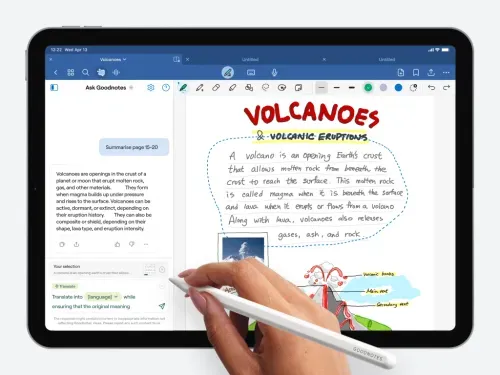

Whether you're attending university lectures or conducting literature-heavy research, your iPad and Apple Pencil are powerful companions. And when it comes to taking digital notes or annotating PDFs, two apps dominate the conversation: GoodNotes and Flexcil.
This in-depth comparison breaks down how these apps perform in everyday academic use—so you can decide which suits your study style better.
🔍 Quick Navigation
- 1. Interface & Usability
- 2. PDF Tools & Annotation
- 3. File Management
- 4. Cloud Sync & Devices
- 5. Handwriting Experience
- 6. OCR & Search Capabilities
- 7. Exporting & Sharing
- 8. Academic Use Cases
- 9. Cost & Value
- 10. Summary Verdict
1. User Interface & Design
GoodNotes resembles a digital notebook collection—custom covers, multiple templates, and a clean interface make it ideal for organizing by subject or course. Its simplicity is welcoming to new users.
Flexcil leans into productivity. It’s optimized for multitasking and academic workflows, offering split-view and reference panels from the start. Its interface prioritizes document handling over aesthetics.
Verdict: Prefer digital notebooks? Go with GoodNotes. Need streamlined academic PDF navigation? Flexcil wins.
2. PDF Markup & Study Tools
GoodNotes is fast and simple—annotate PDFs with Apple Pencil, add text, or highlight as you read. However, it lacks advanced tools like reference linking or research note building.
Flexcil was built with academic reading in mind. You can drag quotes, build side-notes, and create structured highlights—without leaving your reading view.
Verdict: Casual PDF annotation? GoodNotes. Intensive academic reading? Flexcil stands out.
3. Managing Your Notes
GoodNotes gives you beautiful folders and stacked notebooks. Visual learners may love its colorful, shelf-like layout.
Flexcil supports advanced sorting—tags, workspaces, and linked documents. Ideal for users handling large volumes of readings or projects.
Verdict: GoodNotes = visual simplicity. Flexcil = complex academic file systems.
4. Syncing Across Devices
GoodNotes syncs through iCloud—great for Apple-exclusive users. It even has a web beta viewer for occasional access elsewhere.
Flexcil syncs via iCloud, Google Drive, Dropbox, and OneDrive. It’s flexible and compatible with multiple platforms.
Verdict: GoodNotes for Apple purists. Flexcil for cross-platform users.
5. Handwriting & Pencil Feel
GoodNotes feels amazing for writing. With near-paper texture and strong palm rejection, it leads in this category.
Flexcil is responsive and functional—but writing doesn’t feel quite as natural. However, it offers gesture-powered shortcuts and review panels.
Verdict: For handwriting joy: GoodNotes. For smart interactions: Flexcil.
6. OCR & Text Searching
GoodNotes supports OCR for handwriting, typed notes, and PDF text. Its search is quick and reliable.
Flexcil enhances search with contextual tools—turning selections into side notes, searchable references, or citations.
Verdict: Both have OCR. GoodNotes is straightforward; Flexcil is feature-rich for research workflows.
7. Sharing & Export Options
Both apps export notes as PDFs, images, or native files. GoodNotes auto-backs up to iCloud or Google Drive.
Flexcil adds smart export—grouping notes, extracting highlights, or filtering by tag.
Verdict: Both are strong. Flexcil gives researchers more options.
8. Best for Academic Work
GoodNotes fits students who write notes, study diagrams, and prep for exams.
Flexcil is better for reading-heavy tasks—researchers, grad students, and academic writers benefit most.
Verdict: Lecture notes? GoodNotes. Deep reading + reference? Flexcil.
9. Price & Value
GoodNotes has a one-time cost (~$10) with full access.
Flexcil offers a free tier with optional Pro upgrade—great for trying before buying.
Verdict: Budget-conscious? Try GoodNotes. Want flexibility? Start with Flexcil free.
📝 Final Thoughts: Which One Fits You?
| Feature | GoodNotes | Flexcil |
|---|---|---|
| Interface | Notebook-style, intuitive | Document-focused, multitask-friendly |
| PDF Tools | Basic markup tools | Advanced annotation & reference |
| Cloud Sync | iCloud only | Multiple cloud services |
| Best Use Case | Note-taking students | Academic researchers |
| Price Model | One-time purchase | Free + Pro upgrade |
Bottom Line: Both GoodNotes and Flexcil are excellent in their own right. If your goal is polished handwriting and classroom-style notes, GoodNotes will impress. For power users managing dense academic material, Flexcil is a versatile research companion.
✨ Tip: Try both—GoodNotes is inexpensive and Flexcil offers a free version. Choose what aligns best with your learning style.
GoodNotes Flexcil note-taking app PDF annotation academic tools iPad productivity Apple Pencil


댓글
댓글 쓰기